

There's a special kind of optimism involved in putting a 47-column spreadsheet onto a PowerPoint slide. Somebody, somewhere, has looked at several thousand numbers and thought: yes, the audience absolutely needs all of these, chuck them in the pitch deck.
The spreadsheet is duly shrunk to approximately the dimensions of a postage stamp. The important figures are highlighted in yellow, three arrows are added for emphasis and somebody from compliance asks for the source to be included in 8pt type at the bottom. By the time the presentation begins, the person in row three has already given up, while the person at the back is essentially being shown a mildly colourful rectangle. Then the presenter says those immortal words: "You probably can't read this, but..." At which point you do have to wonder why everybody's looking at it in the first place.
This is the fundamental problem with bad presentation design. It mistakes putting information on a slide for communicating information to an actual human being, and they're two very different things. We live in organisations that generate astonishing quantities of complexity, from market research and customer journeys to financial models, sustainability targets, scientific evidence, product architectures and strategies containing enough arrows to make Heathrow air traffic control nervous. Eventually, much of it ends up in a deck that needs to convince an investor, explain an innovation, persuade a board, win a pitch or help several hundred employees understand what the leadership team has apparently spent nine months deciding.
The temptation to include absolutely everything is understandable, particularly when everyone involved in a project believes their contribution is essential. Unfortunately, presentation software gives us almost unlimited opportunities to add information, while the human beings expected to absorb it have rather more limited capacities. The result is often a document that's technically comprehensive but practically incomprehensible, a triumph of information density over actual communication.
Good presentation design requires a certain amount of restraint, then, but there's more to it than simply stripping things back. The best presentations don't remove complexity so much as organise it, establishing what an audience needs to see first, what can wait, what deserves a chart and what belongs in the spoken explanation. They recognise that visual storytelling, information design and data visualisation aren't decorative skills applied once all the serious thinking has been done. They're essential parts of the thinking itself.
Understanding the audience before designing the slides

Ihor Protsenko
Before anyone opens PowerPoint, Keynote or Google Slides, there's a deceptively simple question worth asking: what should somebody understand differently when this presentation is over? Not what information do we have, what does the CEO want included or what appeared in last year's deck, but what does the audience actually need to understand?
Those questions produce surprisingly different presentations. Imagine a technology company introducing a new piece of infrastructure software. Internally, the team might be fascinated by its architecture, integrations, machine-learning models, deployment methodology and the 38 features that took three years to develop. A prospective customer, meanwhile, might be wondering something considerably simpler: will this stop my projects going wrong?
Starting with that question doesn't betray the complexity of the product. It gives the complexity somewhere useful to go. Once the audience understands the problem being solved, the technical information has a purpose and a context. Without that organising idea, even the most beautifully executed slides risk becoming an extended demonstration of how much the business knows about itself.
This is where information design becomes particularly valuable, because it establishes hierarchy before aesthetics. Before deciding which font or colour makes the content look appealing, there are several more useful things to consider:
-
Start with the audience's problem, not your organisation's achievements. Investors, customers, employees and industry specialists all approach presentations with different expectations. An investor might want to understand commercial opportunity and risk, while a prospective client is more likely to care about what your product or service can do for them. Give people a reason to care before expecting them to appreciate the detail.
-
Decide what the audience should remember. Most presentations contain considerably more information than anyone will retain. Identifying two or three essential takeaways early helps determine which material deserves emphasis and which can support the argument without dominating it.
-
Put claims alongside the evidence supporting them. When presenting complicated information, don't force people to remember an assertion for several slides while they wait for the proof. Bringing the two together makes your argument easier to follow and your conclusions easier to assess.
-
Understand how the presentation will be experienced. A live presentation can rely on a speaker to provide context, while a deck intended to circulate independently needs enough explanation to make sense without one. If the same material needs to serve both purposes, consider producing separate versions rather than forcing every slide to do everything.
A particularly effective example can be found in Creativepool member Ihor Protsenko's PipelineSentry pitch deck. Designed for a technically complex pipeline-integrity digital twin, the 13-slide presentation was rebuilt around one straightforward principle: every claim sits directly alongside the evidence supporting it. Custom infographics, technical iconography and visualised anomaly data serve that logic rather than competing with it, making a sophisticated proposition easier to evaluate without compromising its technical credibility.
It's a principle that applies well beyond energy infrastructure. If you're making a claim, show the evidence. If you're describing a process, make that process visible. If two things are being compared, give the audience a way to understand the comparison without forcing them to perform mental gymnastics. You'd be amazed how many presentations instead place the claim on slide 12, the proof on slide 26 and the explanation in an appendix nobody reaches because the meeting has already run over.
The order matters because presentations happen through time. Unlike an article, which allows readers to move backwards, revisit a paragraph or skip ahead, a live presentation generally controls the sequence in which information arrives. Each slide should build upon something the audience already understands, adding another layer rather than asking them to reconstruct the argument from scattered pieces.
There's also an important distinction between designing a presentation and designing a deck, even though the terms are frequently used interchangeably. A presentation is an event, with a person there to provide context, interpretation and personality. A deck is an artefact that might be emailed afterwards, forwarded to somebody who wasn't in the room or reopened six weeks later with nobody available to explain why slide 19 contains nothing but a photograph of a lighthouse.
A deck designed purely for live delivery can be wonderfully sparse because the speaker supplies the missing detail. One intended for independent reading needs more explanation, and trying to force the same slides to perform both jobs often creates the worst of both worlds. There's too much information for the room and not quite enough for the person reading it independently. Knowing which experience you're designing for, or planning separate versions for both, should be one of the earliest creative decisions.
Why complex information needs a story

Kristopher Hadwin
PowerPoint has committed many crimes against communication over the years, but in fairness, most of them happened before anybody opened the software. The trouble usually begins when a presentation is assembled according to the organisation's internal structure rather than the audience's understanding of the subject.
First comes the company history, followed by the capabilities, market overview, research, methodology and individual departmental updates. Before long, you've recreated the company intranet in widescreen, complete with corporate photography and a slightly unsettling number of stock images featuring people pointing at glass walls.
Visual storytelling offers a more useful alternative because it gives information a sense of movement. Where are we now, what's the problem, why does it matter and what have we discovered that changes our understanding? Once those questions have been answered, there's a natural route towards the proposed solution and whatever action the audience needs to take.
Not every presentation needs Hollywood's three-act structure or a surprise villain hiding in the procurement department, but it does need progression. Some of the most effective ways to give complicated information a narrative structure include:
-
Establish the problem before introducing the solution. Audiences are more likely to appreciate the significance of a product, strategy or recommendation when they understand the challenge it addresses. Starting with the solution can mean spending the rest of the presentation explaining why anybody should care.
-
Build a logical sequence. Think about the order in which somebody unfamiliar with the subject would naturally ask questions. Move from context to problem, from problem to evidence and from evidence to conclusion, rather than allowing the organisation's internal structure to dictate the running order.
-
Use visual storytelling to reveal relationships. Timelines, diagrams, illustrations and data visualisations can show how ideas connect, how situations have developed and what might happen next. A complicated process becomes considerably easier to understand when people can see how its individual components relate to one another.
-
Give each slide a distinct purpose. Every slide should contribute something to the argument, whether that's introducing an idea, supporting a claim, demonstrating a comparison or revealing a conclusion. If removing a slide makes absolutely no difference to the presentation, it probably wasn't doing much work in the first place.
-
Make the headlines tell the story. Slide titles should communicate conclusions rather than simply label categories of information. "Revenue by market" tells us what's being shown, while "Germany now accounts for half our European growth" tells us why the information matters.
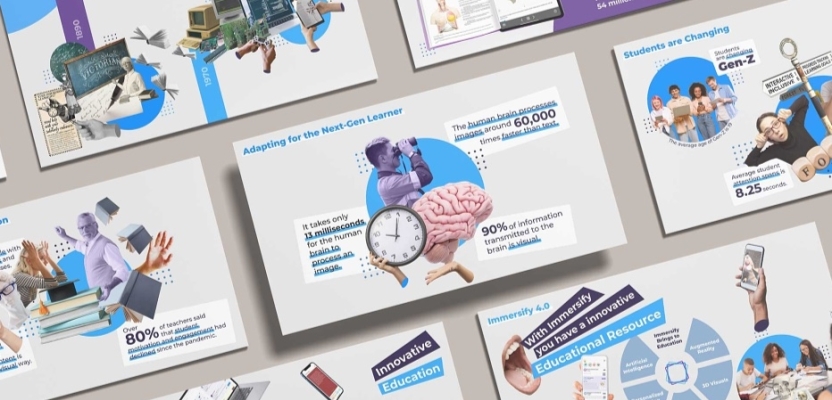
Creativepool's Kristopher Hadwin demonstrates this particularly well in his Flipped Classroom pitch deck for Immersify. The original brief involved institutional data, student feedback, retention problems and the evolution of education across four industrial revolutions, which sounds like enough material to keep several university committees occupied for the foreseeable future. Rather than treating these elements as separate categories, Hadwin organised the presentation chronologically, moving from historical educational models towards contemporary immersive technology.
The accompanying visual language evolves with the story, using illustration and different design treatments to keep the human experience of education present within what could easily have become a dry institutional exercise. Instead of simply explaining how educational technology has changed, the deck allows audiences to follow that evolution and understand why the proposed innovation matters.
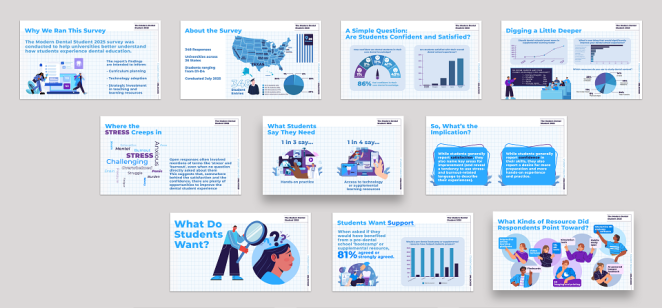
Hadwin's related Modern Dental Student project takes a similar approach to research data. Dense survey material was transformed into a modular design system that combined illustration, infographics and visual hierarchy across presentations, webinars and white papers. The intention was to make the findings feel human rather than purely statistical, recognising that the information concerned actual students with experiences and concerns that couldn't always be adequately represented by another percentage on a slide.
That distinction is central to sophisticated presentation design. Simplifying the way an idea is communicated doesn't necessarily mean simplifying the idea itself. In fact, thoughtful visual design can reveal complexity more effectively than pages of written explanation because it makes relationships immediately apparent.
Consider a business reporting that customer satisfaction has increased among existing customers aged 35 to 54 in the North West, even though overall satisfaction remains broadly static because scores have declined among newer customers. You could put that entire sentence on a slide and ask the audience to read it while listening to you say something else, which is an excellent way to ensure they remember neither.
Alternatively, you could visualise overall satisfaction first, reveal the customer segment responsible for the increase and then contrast it with the group pulling the average down. It's the same information, but the audience experiences it differently. They can see the relationship rather than having to construct it themselves, which makes the finding considerably more memorable.
The point isn't that every sentence needs to become an infographic. It's that some relationships are much easier to understand visually, particularly when they involve comparison, sequence, proportion or change over time. A good presentation designer learns to recognise those opportunities and use the visual language that best supports them.
There's an editorial skill involved here too. A slide should generally have one dominant purpose, even when it contains supporting information, and its central takeaway should be apparent without requiring an archaeological excavation. "Revenue by market" might be an accurate description of what a chart contains, but "Germany now accounts for half our European growth" is an actual point worth communicating. The former tells the audience what they're looking at, while the latter tells them why they should care.
Consistency also plays an important role. Repeating certain typographic conventions, positions, scales and colour relationships helps the audience concentrate on the information rather than continually relearning the design system. Likewise, introducing a complicated process in stages can be more effective than presenting the entire thing fully assembled, looking like the dashboard of a nuclear submarine.
It's why the best presentation designers frequently behave more like editors than illustrators. Their skill lies as much in deciding what doesn't deserve attention as in determining how the remaining information should look.
When data visualisation becomes visual storytelling

The Dubs
Nothing announces "we have data" quite like a chart nobody can understand. There's a tendency in some corners of the creative industry to treat data visualisation as an opportunity to make numbers look sufficiently futuristic that nobody dares admit they haven't the faintest idea what's happening.
Three-dimensional doughnut charts, animated networks drifting through space, bubbles inside other bubbles and twelve shades of almost identical blue can all look impressive in isolation. Occasionally, they might even be appropriate. More often, however, they're a distraction from the reason the numbers were included in the presentation in the first place.
The purpose of data visualisation isn't to prove that data exists. It's to help the audience notice something meaningful about it. Before choosing a visual treatment, designers should consider whether the underlying information concerns comparison, distribution, composition, scale, location, relationships or change over time, and then choose the clearest way of revealing that pattern.
That doesn't mean every presentation should become an austere parade of bar charts. Creative expression has an important role to play, particularly when the subject matter needs to generate interest or emotional engagement. But the visual ambition has to serve comprehension rather than replace it.
One of the most interesting examples within Creativepool isn't actually a presentation at all, which is precisely what makes it useful. The Little Book of Data for Aviva Investors, created by The Dubs, took a subject notorious for dense charts and dry corporate communication and turned it into something considerably more engaging.
The project involved more than 80 pages and 40 curated data visualisations, each redrawn and colourised to create a coherent visual identity. Rather than treating financial information as an obligation to be endured, the agency approached it as something worthy of genuine editorial craft. The publication won Silver and People's Choice in Publishing at the Creativepool Annual 2019, with feedback included in the case study suggesting advisers found the material both useful and unusually engaging.
There's an obvious lesson for anyone creating board presentations, investor decks or thought-leadership material. Serious information doesn't have to look miserable, and clarity and personality aren't mutually exclusive. The creative challenge is to find a distinctive visual language that makes the information more accessible without compromising its integrity.
Consistency is particularly important when presenting complicated data. It doesn't mean every chart should look identical, but the audience shouldn't have to relearn the visual grammar every time the slide changes. If green means growth on slide six, it probably shouldn't mean decline on slide 17 because somebody liked the colour palette. If circles represent customers in one diagram, using them to represent revenue in the next introduces an unnecessary layer of interpretation.
Labelling information directly can be just as important as the choice of chart. Every journey an audience member has to make between a data point, legend, axis and explanatory footnote adds another small piece of mental work. Sometimes that effort is unavoidable, particularly when dealing with complex scientific or financial information, but much of it can be eliminated through better layout and clearer hierarchy.

Ashley Carre
Creativepool member Ashley Carre's Maersk Air Freight deck redesign illustrates what happens when those principles are applied across an entire presentation system. The project brought together material developed by different teams over several years into a coherent framework spanning seven regions, with maps, charts, iconography and organisational diagrams all incorporated into a rebuilt PowerPoint template.
The significance of that work extends beyond the individual slides. A well-designed presentation template isn't simply a collection of approved title pages and brand colours. At its best, it's a decision-making system that establishes how the organisation communicates different types of information. It gives future users a clear approach to comparisons, diagrams, section changes and data visualisation, while allowing them enough flexibility to communicate new ideas.
The payoff isn't simply prettier presentations. It's fewer opportunities for everyone in the business to invent a completely different visual language before Friday's board meeting, along with a much greater chance that the audience will actually understand what's being presented.
What the Creativepool community gets right about information design
Cafe Information Design
Looking across the Creativepool community, it's striking how little the strongest examples have in common aesthetically. Some are sparse and understated, while others are rich with illustration, typography and visual detail. Some rely on carefully structured diagrams, while others approach complicated material through narrative or human experience.
What connects them is the understanding that design should explain rather than simply decorate. The Creativepool Annual 2026 provides a particularly relevant example through its Data category, which recognises work where information is integral to the creative idea rather than merely supporting it.
There are several lessons worth borrowing from the work being produced across the community:
-
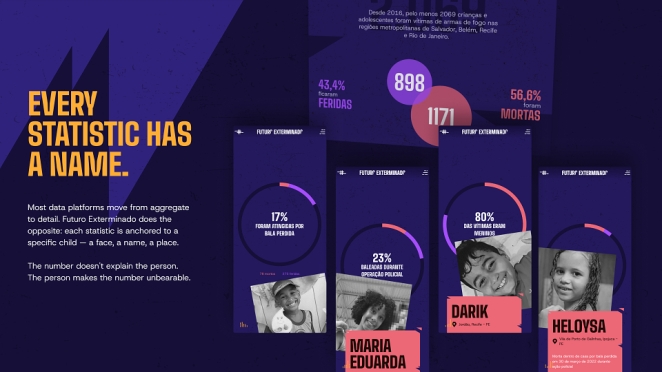
Make information meaningful by connecting it to people. Café Information Design's Futuro Exterminado, created for Fogo Cruzado, won Silver in Data at the Creativepool Annual 2026. The project transforms fragmented reports concerning gun violence against children into structured evidence designed to reveal the scale and systemic nature of the problem. Although it isn't a PowerPoint presentation, it demonstrates how data becomes more meaningful when somebody identifies the human question behind the numbers. "Here are the statistics" is rarely a particularly compelling story on its own. "What do these statistics mean for actual people?" is a much more powerful place to begin.
-
Make technical information easier to assess, not merely easier to look at. Ihor Protsenko's PipelineSentry presentation demonstrates how a disciplined approach to visual hierarchy can support credibility. By bringing technical claims and the evidence supporting them together, the design helps audiences evaluate a sophisticated proposition without having to remember information scattered across dozens of slides.
-
Use illustration to give research a human dimension. Kristopher Hadwin's work for Immersify demonstrates the value of treating research as something more than a collection of percentages. Custom illustrations, infographics and carefully structured layouts help connect institutional data with the experiences of students, creating presentations that communicate on both an analytical and emotional level.
-
Don't be afraid to give serious information some personality. The Dubs' Little Book of Data for Aviva Investors proves that complex financial information doesn't need to be presented through grey backgrounds, tiny legends and increasingly elaborate charts. The project's editorial approach makes the information more appealing without sacrificing its substance, providing a useful lesson for anyone designing investor presentations or research-led thought leadership.
-
Think beyond the individual presentation. Ashley Carre's work for Maersk demonstrates the value of creating flexible systems rather than isolated decks. A consistent visual language allows information to be reused across teams, territories and formats while preserving clarity and brand recognition.
What's particularly interesting is that these examples arrive at similar conclusions through completely different disciplines. Café specialises in information design across interactive visualisations, dashboards, infographics and digital experiences, while Protsenko and Hadwin approach complexity through the specific demands of commercial presentations. The Dubs brings editorial personality to financial information, and Carre demonstrates how structured design systems can improve communication across an organisation.
Together, they show that good information design isn't defined by the software, the medium or even the aesthetic. It's a method of organising evidence so that the important relationships become visible.
It's also worth considering how the modern presentation increasingly exists beyond the meeting in which it was originally delivered. Somebody screenshots a particularly useful slide for Teams, marketing turns a few pages into a LinkedIn carousel, sales extracts three diagrams for a prospective client and an executive emails a PDF to somebody who missed the original discussion. Six months later, part of the presentation might reappear in a webinar or internal training session.
Good design systems anticipate this kind of fragmented afterlife. They make important information easy to identify and preserve meaning when individual slides are removed from their original sequence. That's particularly valuable for businesses creating research-led presentations, where a chart or finding might need to communicate independently across several platforms.
A distinctive presentation identity can therefore become something more substantial than a one-off creative exercise. It can establish a consistent and recognisable way for an organisation to communicate its thinking, helping complex information retain its clarity as it moves between audiences and formats.
Designing for the room, the screen and the person who wasn't there

Rock Candy Media
One of the most common mistakes in presentation design is assuming that a deck which looks excellent on a designer's laptop will work equally well in a conference room, on a shared screen or as a PDF opened on somebody's phone.
Each environment creates different demands, beginning with where the audience's attention is supposed to sit. During a live presentation, the speaker is the principal interface and the slides should support what's being said. A photograph, striking statistic, short phrase or carefully composed diagram may be enough because the presenter supplies the necessary context.
This can feel counterintuitive to clients who've spent months assembling research and want every detail represented on screen. But asking people to read dense paragraphs while listening to a speaker explain the same subject creates competing demands on their attention. If the slide contains several minutes' worth of reading, the audience will inevitably stop listening while they work through it.
A presentation intended for independent viewing is a different proposition. There isn't anyone standing beside slide 14 explaining what the arrows mean, so context that originally lived in the speaker's voice has to exist somewhere accessible. That might involve additional explanatory text, notes, captions or accompanying material, depending on how the document will be used.
It's one reason why "send me the deck" can occasionally reveal just how little sense a seemingly successful presentation makes once it's separated from its presenter. The solution isn't necessarily to make every live slide denser. Often, the more elegant approach is to create a concise version for delivery and a more detailed version for circulation, with both built from the same visual system.
Accessibility introduces another important consideration, and it's something that needs to be addressed during the design process rather than added five minutes before distribution. Microsoft's accessibility guidance recommends readable typography, sufficient contrast, meaningful alternative text and logical reading orders so that people using screen readers can understand slide content. Google Slides also provides accessibility support, including screen-reader functionality and live captions for presentations.
These tools are useful, but accessible presentation design begins long before anybody opens an Accessibility Checker. Information shouldn't depend entirely on colour to communicate distinctions, particularly when some viewers may struggle to distinguish certain shades. Type needs to be legible from the back of a room rather than merely attractive on a laptop screen, while charts should have meaningful titles and clear labels. If an image contains essential information, there should be another way to access that meaning.
The same consideration applies to presentations that might be viewed silently online or printed for circulation. Designers need to understand which elements are essential to comprehension and ensure those elements survive changes in format.
Evidence also needs to remain traceable, particularly in financial, scientific, research and investor presentations. Nobody wants the bottom of every slide to resemble an academic bibliography, but a short source reference can add credibility when the provenance matters, while notes or an appendix can provide fuller information. What shouldn't happen is for "according to research" to become a magical phrase that apparently absolves everyone from identifying which research they're talking about.
As for the perennial question of which presentation software is best, the answer is probably less exciting than the industry's competing ecosystems would like us to believe. It's whichever platform allows the people responsible for creating, presenting and updating the material to do their jobs reliably.
PowerPoint remains capable of sophisticated presentation systems, while Google Slides offers obvious advantages for browser-based collaboration. Keynote works perfectly well in Apple-led environments, and design teams might choose to develop their initial visual thinking in Figma or Adobe software before transferring the finished system into a format the client can use independently.
That final consideration is particularly important. A presentation that looks beautiful but breaks the moment the marketing director changes a headline isn't an especially useful corporate design system. Good design should survive contact with the people who actually need to use it.
Knowing when to stop designing

Alchemy Mill
There comes a point in almost every presentation project when somebody suggests that the company logo should be three millimetres larger. It's usually a reliable sign that attention has begun drifting towards the details that are easiest to change rather than those that make the biggest difference.
Before anybody starts adjusting the logo, there are several more useful ways to judge whether a presentation is actually finished:
-
Look at the presentation as a whole. Open the slide sorter and examine the entire deck rather than concentrating on individual slides. Even at thumbnail size, there should be some sense of rhythm and progression, with moments of information, emphasis, comparison and conclusion. If 42 slides all look equally dense, the audience will probably experience them as one long visual hum.
-
Read the headlines in sequence. They should make a coherent argument even without the supporting content. Titles such as "Market Overview", "Customer Research" and "Strategic Opportunity" describe subjects, but they don't explain what the audience should understand. Headlines that communicate actual findings make the story much easier to follow.
-
Check whether the presentation works without its presenter. If the deck is intended for circulation, somebody who wasn't in the room should still be able to follow its central argument. Equally, a presenter should be capable of explaining that argument without depending entirely on the slides. Great design should support the thinking rather than conceal weaknesses in it.
-
Test the presentation with somebody unfamiliar with the material. Find someone who wasn't involved in the project and ask them to explain what they understood. Don't simply ask whether everything made sense, because people are generally polite and will tell you it did. Getting them to summarise the main point will reveal far more about the effectiveness of the communication.
-
Be prepared to remove information rather than add more. When an audience struggles to understand something, the instinctive response is often to provide another explanatory slide. Sometimes the better answer is to simplify the structure, remove unnecessary information or reconsider the order in which ideas are introduced.
Carity isn't created by making complicated information look simple. It comes from understanding what that information means, identifying what matters to the audience and finding the most effective way to communicate it. That's what separates decoration from visual communication, and somebody who knows how to use presentation software from somebody who genuinely understands presentation design.
How to find a presentation designer through Creativepool

Ashley Carre
Of course, understanding what makes a presentation effective and having the skills or resources to create one are two different propositions. Plenty of businesses know exactly what they need to communicate but struggle to turn that information into something that looks professional, works across different formats and holds an audience's attention.
That's where bringing in a specialist presentation designer can make a considerable difference. The right creative professional won't simply make your existing slides look more attractive. They'll help you establish a clearer narrative, organise complicated information, develop a coherent visual language and make sure the finished presentation works for the people who'll actually be using it.
Creativepool offers a way to discover those specialists through its wider community of designers, creative professionals and agencies. Businesses can browse the Graphic Designers directory, explore individual portfolios and look for specialists with experience in presentation design, pitch decks, information design or data visualisation.
The important thing is to look beyond the job title and pay attention to the work itself. Someone who creates exceptional brand identities might not necessarily have experience turning a complicated financial model into an investor presentation, while a designer specialising in technical diagrams might be better suited to a research-led project than somebody whose portfolio is built around consumer advertising.
Start by identifying the kind of presentation you need. Is it a sales deck designed to persuade potential clients, an investor presentation that needs to establish commercial credibility, a conference keynote intended to hold a room or an internal presentation that needs to communicate a complicated strategy? Each requires a slightly different combination of storytelling, information design and technical expertise.
Once you've identified promising candidates, examine how they've approached similar problems. Do their portfolios demonstrate clear hierarchy and thoughtful use of information? Can they show complicated subjects being communicated effectively rather than simply presenting attractive slide layouts? And, importantly, do they understand the software and formats your organisation will need to use once the work is complete?
Creativepool also allows businesses to search for creative talent and connect with professionals whose portfolios demonstrate relevant experience. For larger projects requiring several disciplines, such as copywriting, information design, animation and presentation production, businesses can explore creative agencies and companies or advertise a brief to attract suitable partners.
A good brief should explain the audience, the purpose of the presentation, the central argument, the available information and how the finished work will be used. It should also establish practical considerations such as format, deadlines, brand guidelines and whether the client needs to be able to edit the slides independently.
The more clearly you define the communication problem, the easier it'll be to find somebody capable of solving it. A beautiful PowerPoint template can certainly be useful, but if your audience still doesn't understand what you're trying to say, you've essentially paid somebody to make the confusion look more expensive.
Great presentation design makes ideas worth understanding

Gary Meredith
Ultimately, the difference between a forgettable presentation and an effective one has very little to do with how many transitions, animations or expensive-looking stock photographs somebody managed to squeeze into the deck. It's about whether the audience leaves understanding something they didn't understand when they arrived.
That's a surprisingly demanding creative challenge. It requires designers to understand complicated subjects, recognise which information genuinely matters and make difficult decisions about what should be shown, explained, simplified or removed. It also means resisting the perfectly understandable temptation to confuse visual sophistication with effective communication.
The strongest work within the Creativepool community demonstrates just how valuable that thinking can be. Whether it's transforming technical research into a persuasive pitch deck, bringing institutional data to life through illustration or turning financial information into something people might actually enjoy exploring, the underlying objective remains the same. Good design gives complicated ideas a structure that makes them easier to understand and harder to forget.
For businesses, that means approaching presentation design as a strategic investment rather than the final cosmetic stage of preparing for a meeting. A well-considered presentation can help secure investment, win clients, communicate change and make complicated decisions easier to navigate. A poorly considered one can undermine an otherwise excellent idea before the audience has had a chance to appreciate it.
And none of this means pretending that difficult subjects are easy. The best presentations might still contain serious science, intimidating financial models, unfamiliar technology or research that requires genuine concentration. They simply refuse to make those things any harder than they need to be.
Your audience has already done you the considerable favour of turning up, logging in or opening the document.
Don't make them solve the deck as well.








Ihor Protsenko yesterday, late afternoon
Thanks for featuring PipelineSentry, Benjamin — good company to be in.One thing I’d add to the section on decks living beyond the meeting: the slides that get screenshotted and forwarded are almost never the ones we design as “hero” slides. They’re the diagrams that explain a single relationship cleanly. Worth designing those with that afterlife in mind.
Really enjoyed the piece!