

AI is rapidly transforming the graphic design landscape. With the rise of powerful AI tools capable of generating images, editing graphics, and even videos or music, many in the industry are asking the question: will AI replace designers?
However, more forward-thinking designers are discovering that these tools are less a threat and more a new kind of collaborator. Indeed, AI can handle tedious or technical tasks and allow human designers to concentrate on strategy, emotion, and innovation. The future of design isn’t bleak. It’s just different, with creatives and AI working hand in hand.
To that end, in this feature, we’ll explore ten of the most compelling AI graphic design tools making waves in 2025. These range from established design software suites integrating AI to cutting-edge newcomers. Whether you’re a freelance illustrator, a branding agency professional, or just a non-designer looking to create visuals, these tools can boost your efficiency and spark new creative possibilities.
Let’s dive in.
1. Adobe Sensei & Firefly – AI in Adobe Creative Cloud
Best for: Designers in Adobe’s ecosystem who want AI to automate tedious tasks and enable generative creativity.
Pricing: Adobe’s AI tools are part of the Creative Cloud subscription (starting around $59.99/month for the full suite).
Adobe has woven AI throughout its Creative Cloud apps via its Sensei platform and the newer Firefly generative models. Adobe Sensei uses machine learning to simplify routine design chores within tools like Photoshop, Illustrator, and InDesign.
It can automatically select and mask objects, suggest font pairings, identify patterns, and enhance images – tasks that otherwise would require lots of manual tweaking. By automating these time-consuming steps, designers can spend less time on technical details and more on the creative vision. For example, Photoshop’s Neural Filters (powered by Sensei) let you magically remove blemishes or change a photo’s background in one click, while Content-Aware Fill intelligently patches up gaps.
Meanwhile, Adobe Firefly is Adobe’s family of generative AI models introduced in 2023-2024, specializing in creating media from text prompts. Integrated into Photoshop as Generative Fill and into Illustrator for generative vectors, Firefly allows you to “ask” Adobe apps to create or transform visuals. Need a mountainscape in the background? Just type it, and Firefly will render it on a new layer. These AI features provide “execution and efficiency” at an unprecedented scale, augmenting the designer’s toolkit.
For those already comfortable with Adobe software, Sensei and Firefly make AI a natural extension of your workflow – almost like having an assistant within your favourite programs. By automating the dull bits and offering generative suggestions, Adobe’s AI frees you up to experiment and iterate on the big ideas.
2. MidJourney – Generative Art Powerhouse
Best for: High-quality creative image generation from text; concept art, illustration, and inspiration.
Pricing: The service is paid (plans currently around $10/month for Basic, up to $60/month or more for Pro).
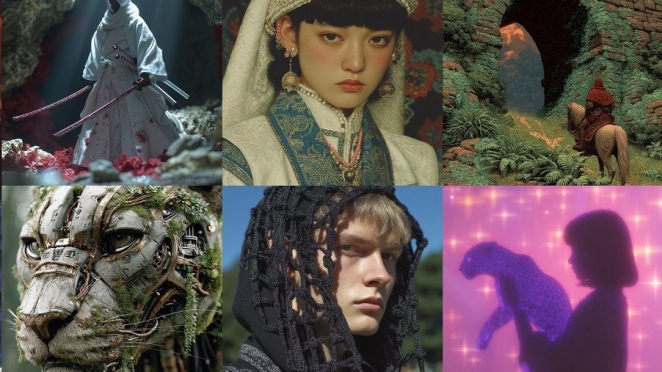
MidJourney has become a leading tool in AI-driven visual creativity, beloved by many artists and designers. It’s an AI image generator where you input a text prompt and receive unique, high-quality images in minutes. MidJourney is known for its imaginative, often artistically styled outputs – everything from realistic product mockups to surreal art pieces. Users can specify styles (e.g. “watercolour illustration of a city skyline”) and MidJourney’s powerful model interprets even complex prompts to produce four image options for you to refine.
It operates through a Discord-based interface (a chatbot) and uses a subscription model. According to recent stats, MidJourney’s popularity has exploded to over 19 million registered users on its Discord server, with 1–2.5 million daily active users generating content. This demonstrates how many creatives are leveraging the tool as part of their workflow.
MidJourney’s appeal lies in its speed and quality – you can brainstorm visuals or get design concepts without picking up a pen. It’s often used for mood boards, concept art, or to generate backgrounds and illustrations. Businesses and individuals alike use it as a “creative partner” for quick imagery. The results are often impressively detailed, though they depend on the prompt detail and the model’s strengths (MidJourney excels at artistic and photographic styles).
While MidJourney’s AI won’t replace a designer’s personal touch, it’s fantastic for brainstorming ideas and producing visual drafts. Many designers use it to generate inspiration or base images which they then edit and incorporate into final designs – effectively using MidJourney to “fast-forward through the mind-wrenching tasks” of blank-canvas brainstorming.
3. OpenAI DALL·E 3 – Text-to-Image via ChatGPT


Best for: Versatile image generation with natural language via ChatGPT; quick ideation and creative exploration.
Pricing: DALL·E 3 is effectively included with a ChatGPT Plus subscription ($20/month) for a set number of generations, with additional usage available via credit packs.
DALL·E was the original headline-grabber in AI image generation, and its latest version DALL·E 3 (released late 2024) keeps it at the cutting edge. OpenAI’s DALL·E 3 is now “built natively on ChatGPT”, meaning you can simply converse with ChatGPT to generate images. This integration allows DALL·E to benefit from ChatGPT’s understanding of nuanced prompts.
For example, you can ask, “Create an image of a futuristic city in the style of Monet,” and ChatGPT will help craft and refine that prompt for DALL·E, then produce the image. The result is highly detailed artwork or illustrations created in response to your description. DALL·E tends to handle structured, vibrant visuals well (e.g. product designs, interior layouts), and it’s also capable of imaginative art. One advantage noted by some users is that DALL·E often interprets literal prompts accurately and even handles text (like signage or logos in images) better than some alternatives.
Using DALL·E 3 is straightforward if you have ChatGPT – it’s available to ChatGPT Plus and Enterprise subscribers within the chat interface. Simply start a conversation describing the image you need, and the AI will generate it, with the ability to iterate. The ease of a conversational interface makes it a friendly tool for non-designers as well.
For designers and content creators, DALL·E is a powerful idea generator and execution tool – you can get a variety of creative images rapidly, then use those as final assets or as a base to build on. As with any AI art, human oversight is needed (DALL·E’s outputs may require editing, and it has content safeguards). But integrated into ChatGPT, DALL·E 3 puts an “AI art studio” at your fingertips.
4. Canva (Magic Design) – AI for Layouts and Social Graphics

Best for: Non-designers and designers creating quick layouts, marketing materials, and social media graphics with AI assistance.
Pricing: Canva has a generous free tier, which includes many AI features, and a Pro plan (~$12.99/month or $119/year for one user, roughly £99/year) for full access to assets and brand tools.
Canva is already one of the world’s most popular design platforms, known for its drag-and-drop simplicity and a huge library of templates. In recent years, Canva has supercharged its platform with AI features under the Magic brand. Magic Design uses AI to suggest layout and design ideas based on your input. For instance, you can provide a few images or a theme, and Magic Design will automatically generate several polished template layouts for a poster, flyer, or social media post.
It’s like having a junior designer instantly draft versions for you. According to Canva, you can “let the tool know what you want to create, and watch your ideas come to life” with appropriate fonts, imagery, and styling chosen by the AI. Canva also offers an AI copywriting tool to generate or improve text for your design if needed – handy for crafting taglines or descriptions.
Other AI-driven features in Canva include Magic Resize, which automatically adapts a design into different dimensions (say, turning your Instagram post into a Facebook cover or an email header with one click). This saves a ton of time when you need consistent branding across multiple channels. Canva’s AI can even generate images (they integrated Stable Diffusion in a previous update) and remove backgrounds from photos with one click, similar to specialized tools like Remove.bg.
Canva’s AI tools make design “easy to create everything”, from posters to presentations, even if you have minimal design experience. For professionals, it’s a quick way to get starting points and automate repetitive tasks, while for small businesses and freelancers, it’s like having a basic design assistant available 24/7. The result: you can produce clean, on-brand graphics in a fraction of the time, and focus more on the content and strategy.
5. Designs.ai – All-in-One Creative Suite

Best for: A comprehensive solution covering logos, graphics, video, and more in one AI-powered platform.
Pricing: Designs.ai offers a 7-day free trial; after that, plans start at around $19/month, making it comparatively affordable for the range of features.
If you’re looking for a one-stop shop for various design needs, Designs.ai is a platform worth checking out. It bundles together multiple AI tools – from logo generation to social media graphics to even video creation – under one roof. The idea is to streamline the creative process by allowing users to seamlessly transition between different design tasks on a single platform. For example, you could use the Logomaker to instantly create a logo by inputting your brand name and style preferences, then switch to Videomaker to produce a quick promotional video using that logo and some text, all without leaving Designs.ai.
What sets Designs.ai apart is this integration and the breadth of content it can generate. Its machine learning models assist in layout design, colour palettes, font selection, and more. Even if you’re not a professional designer, the interface guides you through creating professional-looking designs by suggesting combinations of graphics, fonts, and colors that work well together.
Essentially, Designs.ai acts like an automated junior designer plus production team. For seasoned designers, it can accelerate drafting and give quick mockups to refine. For non-designers or small teams, it’s an accessible way to produce a whole suite of branded materials on your own.
If you need a bit of everything – logos, banners, videos, mockups – and want AI to expedite the process, Designs.ai is a compelling option. It embodies how AI is making “high-quality graphic design more accessible… even to non-designers”.
6. Looka – AI Logo Designer
Best for: Fast and affordable logo creation for brands, startups, or projects without hiring a designer.
Pricing: Looka’s model is pay-per-download: it lets you design for free and you pay once you’re happy and want the files. The Basic logo package (just a PNG file) costs around $20, while a Premium package with multiple file formats and variations is about $65.
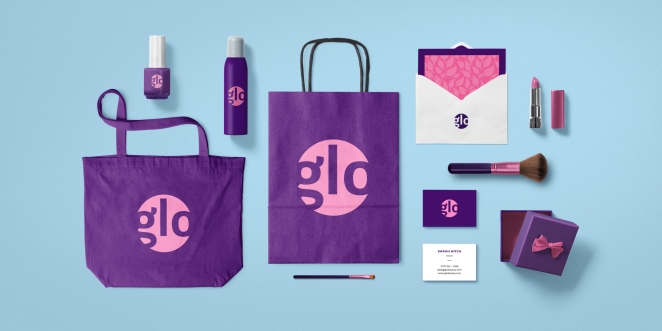
Looka (formerly known as Logojoy) is an AI-powered logo maker that specializes in creating custom logos with minimal effort. Branding is a critical design task, and Looka aims to democratize it. You start by entering your company or project name and selecting your industry. The AI then asks for your style preferences: it shows you sample logos and colour palettes, and you pick what appeals to you.
Using those inputs (preferred styles, colors, symbols, etc.), Looka’s algorithm generates a variety of logo options tailored to your brand’s identity. The results come in within minutes – a gallery of logos in different styles and layouts that you can further tweak (change font, colours, icon positioning) until one fits perfectly.
The strength of Looka is that it “creates unique logos that align with your brand’s identity and values” based on your guidance. For entrepreneurs, freelancers, or small businesses that cannot afford a branding agency, this AI tool offers a do-it-yourself solution that still yields professional-looking results. It’s also great for generating quick prototype logos or inspiration during early concepting (even if you eventually hire a designer, Looka’s outputs can help clarify your vision).
This one-time pricing is attractive for one-off needs. In summary, Looka uses AI to understand user preferences and produce logo designs in line with them. It’s surprisingly effective – while it might not replace a top-tier logo designer for a major brand, it absolutely can produce a solid, eye-catching logo for everyday business needs at a fraction of the cost and time.
7. Let’s Enhance – Image Upscaling and Enhancement
Best for: Improving image resolution and quality (upscaling small or low-quality images for print or HD use).
Pricing: Let’s Enhance operates on a credit system; new users get some free credits (about 10) to start, and paid plans begin at $9/month for 100 credits (with one credit usually processing one image). There’s also pay-as-you-go.
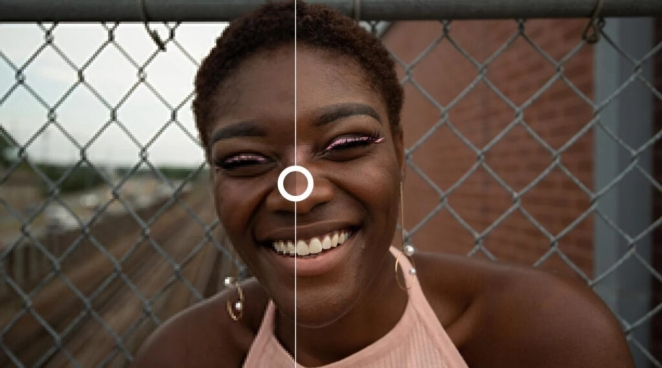
Not all design work is about creating from scratch – often, you have an image that’s too small or low-res for your needs. Let’s Enhance is an AI tool purpose-built for upscaling images up to 16× their original size without the loss of quality that usually plagues enlargement. Traditional methods of resizing often lead to blurriness or pixelation.
In contrast, Let’s Enhance uses a neural network to add detail as it enlarges, intelligently reconstructing textures and sharpening edges so the final image looks crisp. In fact, it can sometimes make an image look better than the original, filling in details that weren’t visible before – like magic, as one description notes.
For graphic designers, photographers, or marketers, this tool is a lifesaver. Imagine you have an old logo file, a client’s tiny photo, or a graphic that was only ever saved for web, and now you need it in high resolution for print or a large display. Running it through Let’s Enhance can turn “even the most pixelated of visual assets into high-quality images.” Designers have been amazed putting a blurry, small image into the tool and getting back a version that’s print-ready. It’s also useful for e-commerce or portfolios, where you want all images in high resolution without reshooting everything.
Let’s Enhance is a prime example of AI working behind the scenes in a design workflow – you might not “see” its effect in a flashy way, but it can drastically improve the professionalism of your visual output by ensuring everything is sharp and clear.
8. Uizard – Sketch-to-Prototype UI Designer
Best for: UX/UI designers (or anyone with an app idea) to turn hand-drawn sketches into digital prototypes.
Pricing: Uizard offers a free tier with limited projects, and paid plans from about $12/user/month for full features. It’s a relatively low cost for speeding up prototyping by 10×.
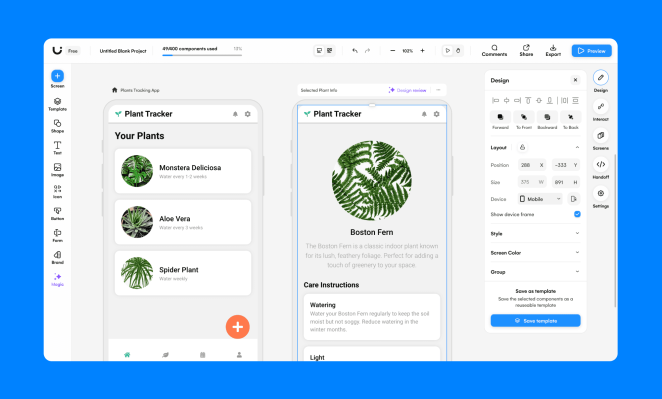
Uizard is an AI design tool that feels a bit like sci-fi: you draw a rough sketch of an app or webpage on paper, and Uizard transforms it into a working digital design. It specializes in turning hand-drawn wireframes into UI prototypes for apps and websites. This means if you sketch a layout with a header bar, some text blocks, and image placeholders, you can upload a photo of that sketch to Uizard and it will output a clean digital mockup with real interface components in place of your scribbles. It’s easier than ever for designers and even amateurs to “bring their ideas to life without having to delve into complex design software,” as Filestage notes.
Beyond the sketch conversion, Uizard provides an intuitive drag-and-drop editor with a library of pre-made components and templates. You can start from scratch or refine the generated prototype by selecting from hundreds of modern design templates for mobile apps, web pages, dashboards, etc.
Uizard even has some AI helpers like a text-to-image generator and a theme generator that creates a colour palette and font theme based on an image or URL you provide – allowing quick styling aligned to a brand. For developers and product designers, Uizard accelerates the early-stage design process dramatically. Instead of spending hours in Figma or Sketch to create a mockup, you could draw it in a meeting and have a presentable prototype by the end of the day.
This tool embodies creative efficiency: it takes your napkin sketches and in seconds gives you something interactive to show or test. For any rapid prototyping needs, Uizard is a game-changer.
9. Autodraw – Instant Sketch Cleanup
Best for: Quick drawings and icons; anyone who “can’t draw” but needs simple visuals or doodles turned into clean art.
Pricing: Free (by Google).
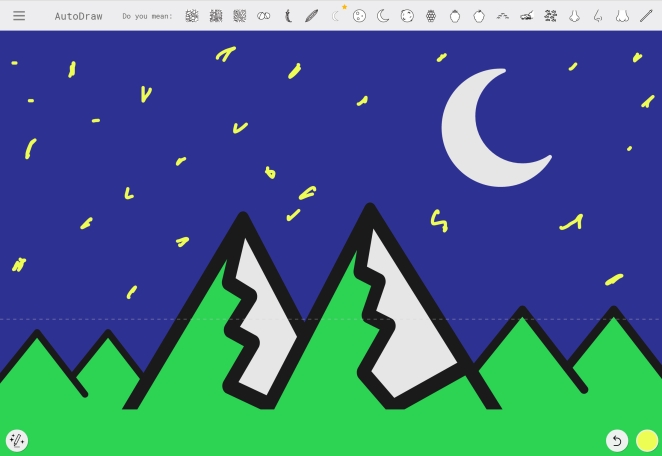
Autodraw is a delightful little AI experiment by Google that has very practical uses in design. It’s essentially an AI-assisted drawing tool: you doodle a rough shape or object with your mouse (or finger, on mobile), and Autodraw guesses what you intended and replaces your scrawl with a polished version.
For example, draw a wobbly circle with two triangles on top, and Autodraw might suggest “Did you mean a cat?” – offering a neat icon of a cat that you can then use. In seconds, your childlike sketch becomes a professional-looking symbol. This tool is incredibly handy when you need a quick icon, logo placeholder, or any simple illustration but lack the drawing skills or time to craft it perfectly. It’s also fun and completely free to use.
Designers can use Autodraw during brainstorming or wireframing to populate a layout with representative graphics without hunting through stock icon libraries. Non-designers can use it to create clipart for presentations or social posts. The underlying AI has been trained on many common objects, so it can recognize shapes from animals to vehicles to basic UI icons. It feels a bit like autocorrect for drawing. Since it’s web-based, there’s nothing to install – just go to autodraw.com and start sketching. The tool will present a row of suggestion images as you draw; click the one that matches and voila. It even supports coloring and adding text, making it a mini graphics editor.
While Autodraw isn’t as full-featured as other tools on this list, it excels at one thing: turning your rough idea sketchesinto usable artwork “in a matter of seconds”. For any creative who has thought “I know what I want, I just can’t draw it,”this AI helper is a godsend.
10. Remove.bg – Background Removal in One Click

Best for: Removing backgrounds from photos cleanly; isolating subjects for collages, product images, or graphic composites.
Pricing: Remove.bg has a free web version for low-res outputs (up to 0.25 megapixels). For higher resolution needs, subscription plans start around $9/month for 40 credits (each credit usually equals one image, so about $0.23 per image). Pay-as-you-go is also available (e.g. ~$1.99 for a single HD credit, with bulk discounts).
Remove.bg does exactly what its name implies – it removes backgrounds from images using AI, and it does it exceedingly well. This might sound like a narrow task, but anyone who has spent time in Photoshop carefully tracing the outline of a person or product to cut it out knows how valuable this can be.
Remove.bg uses computer vision to automatically detect the subject of a photo (people, animals, objects, etc.) and erase the background, giving you a transparent PNG or a new background of your choice. It handles tricky edges like hair or fur with surprising deftness, avoiding the halos or jagged edges that often plague manual cut-outs. In seconds, you get a professional and polishedresult without needing any advanced skills.
Designers frequently need to isolate subjects – whether for placing a model onto a different backdrop, creating product shots for e-commerce, or making collage graphics. Remove.bg saves painstaking hours by doing this automatically. You can batch process images as well, which is great for product photographers editing dozens of shots. The tool also integrates with Photoshop as a plugin and has an API, fitting into workflows easily. Beyond removal, it offers a few editing options: you can leave the background transparent or replace it with a solid color or another image (it even has a small library of stock backgrounds to choose from).
Remove.bg is one of those AI tools that effortlessly slots into your daily routine – whenever you need to knock out a background, it’s there, and it does in one click what used to take 15 minutes of meticulous work. It’s all about making the tedious parts of graphic design easier.
Final Thoughts
As this list shows, AI tools in graphic design come in many forms – from generators that produce content out of thin air, to assistants that supercharge traditional software, to utilities that fix problems in a snap. Graphic designers today have an expanding toolbox. These AI tools are “infiltrating creative workflows at an unprecedented pace”, from design studios to ad agencies, but they are largely sidekicks, not replacements.
Used wisely, they can eliminate drudgery (like cutting backgrounds or resizing assets) and open up new creative avenues (like testing dozens of layout variations or art styles quickly). It’s still up to the designer to provide vision, taste, and the human touch that makes a design truly resonate. The consensus in the creative industry is that AI is a tool – a very powerful one – that designers should embrace and master rather than fear.
By doing so, you can amplify your productivity and perhaps even “explore endless creative possibilities” you wouldn’t have attempted before. So go ahead and experiment with these tools in your next project. You might be surprised at how much they can elevate your work (and save you time), all while you remain the director of the final creative outcome.